There is no focus to this post, just a lot of rambling.
I finally go my computer online. The signal is weak, but usable. The first thing I did was to download updated drivers for all my components. Got all my software registered or activated as needed. Now to rebuild my favorites list. It's probably in my transferred files somewhere, but I'm to lazy to dig it out.
I'm trying to wrap up my Art House Coop sketchbook project. For along time, all I did was gesso pages. Now I have to add content. I did a block print, using a section of a carved easycut panel I had done a while ago. Dang! I couldn't find my printing inks, so I tried acrylic paints. The result is not what I desired.
As I was gessoing the pages, two stuck together. When I tried to separate them, I tore a hole in each. Holey paper, Batman. Now what do I do? I thought of making a designed hole with a paper punch and having a window into the pages beneath. What would you suggest?
Although this is a sketchbook project, I think of it more as an altered book project. Or a scrapbook project. that's why I chose the title, This is NOT a Sketchbook.
I'm a bit remiss in posting pictures of the pages, either here or on my page at arthousecoop.com. As Diane noted on her blog post, procrastinating runs in our family.
Which reminds me. I thought I only had a month and a half to complete the project, but when I went to the web sit and checked, I learned I have until January 15, 2011, to submit. Hey, why am I rushing? I only have 75 more pages to fill.
Showing posts with label Computer. Show all posts
Showing posts with label Computer. Show all posts
Friday, November 19, 2010


Monday, October 11, 2010
sketchbook revisited
I've been so wrapped up in my computer project lately that I haven't been doing much with my sketchbook project.
Time is running out!
Because of the bleed through problem, I began gessoing pages in the book.. I learned that gesso isn't a very good medium to use for this and I began using regular acrylic paint.
Today, I began painting backgrounds for my future entries. I'm using sample paints that I get at various talks and seminars.
Soon it will be time to commit words and images to paper.
I'll keep you posted and put images on this blog, as well as on the art house website.
Time is running out!
Because of the bleed through problem, I began gessoing pages in the book.. I learned that gesso isn't a very good medium to use for this and I began using regular acrylic paint.
Today, I began painting backgrounds for my future entries. I'm using sample paints that I get at various talks and seminars.
Soon it will be time to commit words and images to paper.
I'll keep you posted and put images on this blog, as well as on the art house website.
Wednesday, October 6, 2010
Mid-Stride
The computer is up and running beautifully. Now I have to figure out how to get on the internet. I have a double problem. I'm having trouble configuring the computer and I'm in the dungeon (basement) where the wireless signal is weak.
When I get tired of working on the internet problem, I load software. I've put on Office 2010, Sony Vegas Pro 9, SonicFire Pro SE, Adobe Creative Suite 2 (I'll up grade to CS 5 Master Edition when my budget eases a bit), and a few specialized programs.
As I was trying to decide which software to load, I realized that I have ton of stuff that I never use. Why should I clutter up the system with this? Time to weed out material and donate it to charity. There must be someone still using Win 98.
Since I installed Windows 7 on the new beast, some of my old programs won't work, even if I think they're worth having. When I get on the internet, I'll download the Microsoft application to allow me to use legacy software and hope it works.
Stay tuned for further adventures in the self assembled computer saga.
When I get tired of working on the internet problem, I load software. I've put on Office 2010, Sony Vegas Pro 9, SonicFire Pro SE, Adobe Creative Suite 2 (I'll up grade to CS 5 Master Edition when my budget eases a bit), and a few specialized programs.
As I was trying to decide which software to load, I realized that I have ton of stuff that I never use. Why should I clutter up the system with this? Time to weed out material and donate it to charity. There must be someone still using Win 98.
Since I installed Windows 7 on the new beast, some of my old programs won't work, even if I think they're worth having. When I get on the internet, I'll download the Microsoft application to allow me to use legacy software and hope it works.
Stay tuned for further adventures in the self assembled computer saga.
Monday, October 4, 2010
Baby steps
I finally got the computer to boot, sort of. I had to change the video cable between the computer and the monitor.
Now I get into the boot menu, but cannot figure out how to configure the boot drive. The system sees the drive, but doesn't enable it. Hmmm.
Time to reread the manual and check some cabling.
I'll keep you posted.
Now I get into the boot menu, but cannot figure out how to configure the boot drive. The system sees the drive, but doesn't enable it. Hmmm.
Time to reread the manual and check some cabling.
I'll keep you posted.
Friday, September 10, 2010
Windows 7 Upgrade
A few days ago, I updated my wife's computer from Vista to Win 7 Home Premium. Everything went fine, except I couldn't log into the internet with the wireless connection. My wife was really ticked. "Now why was this upgrade necessary?" It's supposed to make life simpler. Uh-huh.
After 3 days of discussions with the cable Internet provider, the router manufacturer, my computer savvy daughter and her computer savvy husband, and finally Microsoft, I was able to resolve the problem. It seems the Norton Internet Security software thought I was under a virus attack and refused to let me use the wireless connection.
It took an hour and a half of Microsoft tech time to figure that out, so I don't feel too brain dead about it.
Anyway, I deleted the antivirus software, got the wireless router to work, and reinstalled the antivirus software. Everybody seems happy now. I know I am.
The whole process was very educational and I have a better understanding of the operating system now.
Not that I expect to do it again, anytime soon.
After 3 days of discussions with the cable Internet provider, the router manufacturer, my computer savvy daughter and her computer savvy husband, and finally Microsoft, I was able to resolve the problem. It seems the Norton Internet Security software thought I was under a virus attack and refused to let me use the wireless connection.
It took an hour and a half of Microsoft tech time to figure that out, so I don't feel too brain dead about it.
Anyway, I deleted the antivirus software, got the wireless router to work, and reinstalled the antivirus software. Everybody seems happy now. I know I am.
The whole process was very educational and I have a better understanding of the operating system now.
Not that I expect to do it again, anytime soon.
Tuesday, August 24, 2010
Computer woes
Finally got the computer assembled and fired it up. No POST. Could not hear any POST beeps, because of lack of speaker. Seems the chassis manufacturer (Thermaltake) expected the motherboard manufacturer (ASUS) to incorporate it and vice-versa.
Radio Shack didn't have one, so I ordered it online. It cost $2.00. I added a USB cable for $3.00 for a total of $5.00. S&H was $7.00!
C'est la vie.
Now I'm waiting patiently until it arrives and I can get on with my project.
Check back in a week for an update.
Radio Shack didn't have one, so I ordered it online. It cost $2.00. I added a USB cable for $3.00 for a total of $5.00. S&H was $7.00!
C'est la vie.
Now I'm waiting patiently until it arrives and I can get on with my project.
Check back in a week for an update.
Wednesday, July 21, 2010
computer project rework
When I fired up the system for a rough test, I realized that I had installed the CPU cooler backward. The fan exhaust must face the rear chassis fan.
Tomorrow I'll take it apart, clean the thermal paste from the bottom of the cooler and top of the CPU, reapply the thermal paste and reinstall the cooler.
More work for mother.
Tomorrow I'll take it apart, clean the thermal paste from the bottom of the cooler and top of the CPU, reapply the thermal paste and reinstall the cooler.
More work for mother.
Thursday, July 15, 2010
Computer update, nearing the end
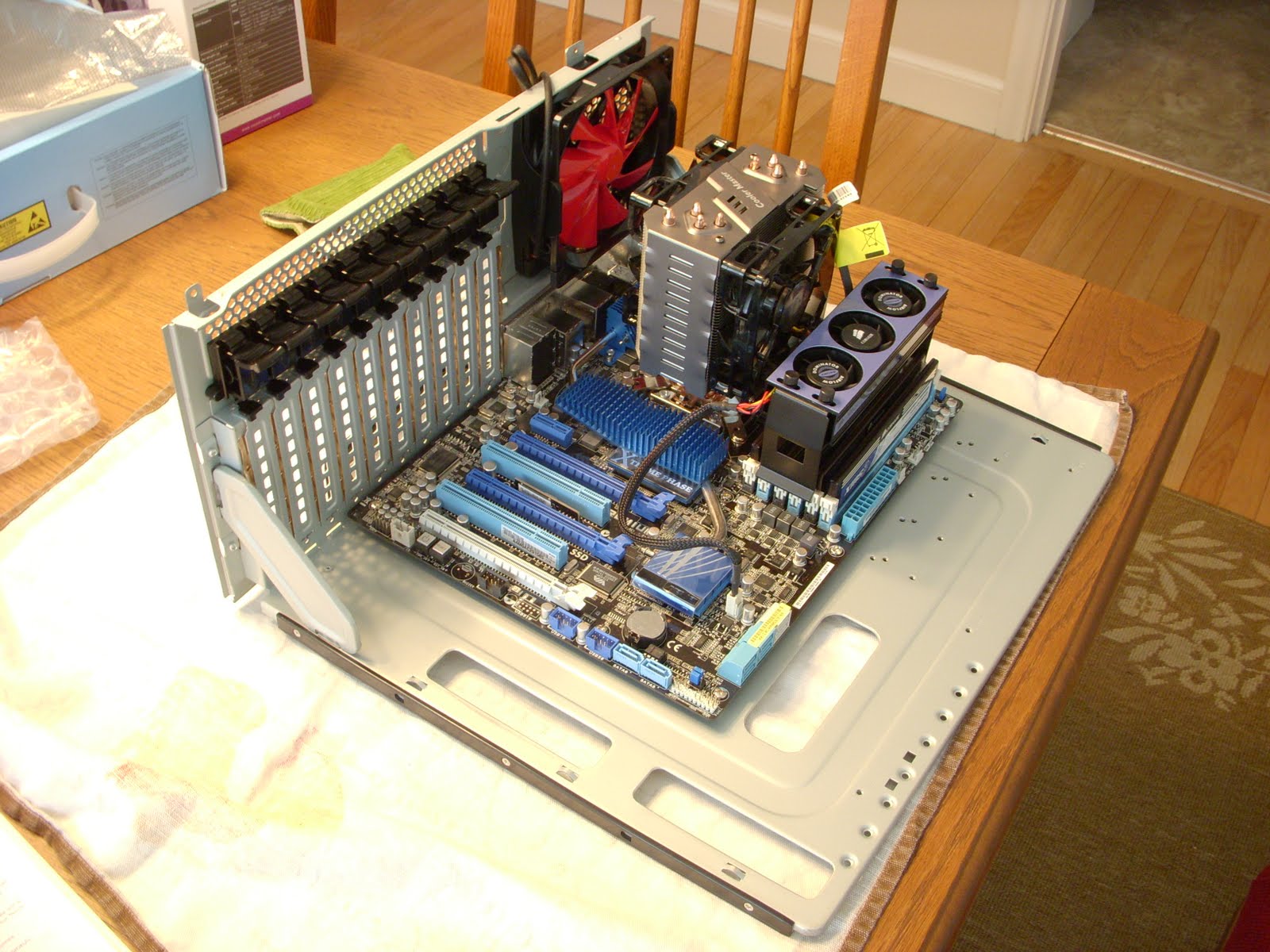
Here it is, the motherboard is installed with the CPU cooler, memory and memory fan.
Now I'm starting to add the components, drives, etc.
I was going to reuse the DVD drive from my old Dell, but it's not a sata drive. The next day I got a notice from Newegg of a special for a Sony DVD burner at @20.00, so I got it.
The last item is the video card. I have to wait until the 20th to order it, because of credit balancing. Boy, I wish I were rich.
Saturday, July 10, 2010
Computer Project Update

I'm adding 12 Gb of Corsair ddr3 1600 RAM to the system. I got the Corsair memory fan cooler shown, to prevent the memory from ovrheating.
The project moves forward in fits and starts.
Saturday, July 3, 2010
CPU and Cooler
 Continuing on with my project. I'm installing an Intel i7-930 Quad core CPU. It operates at 2.8 GHz. This CPU represents a compromise between my wishes and my budget.
The good news is that my motherboard will allow me to upgrade to a six core CPU later, when the prices drop.
I'll be cooling the CPU with a CoolerMaster Hyper N520 CPU cooler. This is reviewed as better than the standard Intel CPU cooler.

Friday, July 2, 2010
Computer project moves on

Got my motherboard (see Pix), CPU, and memory.
I plan to read the manuals several times and then begin the assembly.
First step is to fit the motherboard to the chassis. Then I can add the CPU, memory, CPU cooler and memory fan.
The case has a removable motherboard tray, to make this easier.
I have the boot and data drives ready to install and the DVD burner and Blu-Ray Burner in hand. When this step is done, all I'll have to do is install the graphics card and test the system.
Tuesday, June 29, 2010
power supply installed

I finally got around to installing the power supply in my computer case. Pretty easy. The picture shows the space at the top of the case where the power supply will be mounted.
Then I started to check out other things and found a loose fan in front of the drive bays. I fixed that.
I practiced all the things that needed to be done when I get the rest of my stuff and learned that "toolless" does not necessarily equate to "easy".
Later this week, I'll order the motherboard, CPU, and memory. Then the real fun (and monthly payments) begins.
I practiced all the things that needed to be done when I get the rest of my stuff and learned that "toolless" does not necessarily equate to "easy".
Later this week, I'll order the motherboard, CPU, and memory. Then the real fun (and monthly payments) begins.
Thursday, June 17, 2010
Computer project update

The power supply arrived today. I'm impressed with the packaging. The supply itself came in a rubber lined velvet bag and the low voltage cables are in a lined nylon pouch that is shaped like a brick. the pouch will see further duty as a light or microphone case, I'm sure.
Subscribe to:
Posts (Atom)


 Posts
Posts


